Transport and toolbar
At the top the toolbar with the tools and the view switch, at the bottom a '90s Cubase style transport bar with LCD displays. They are the same in every view.
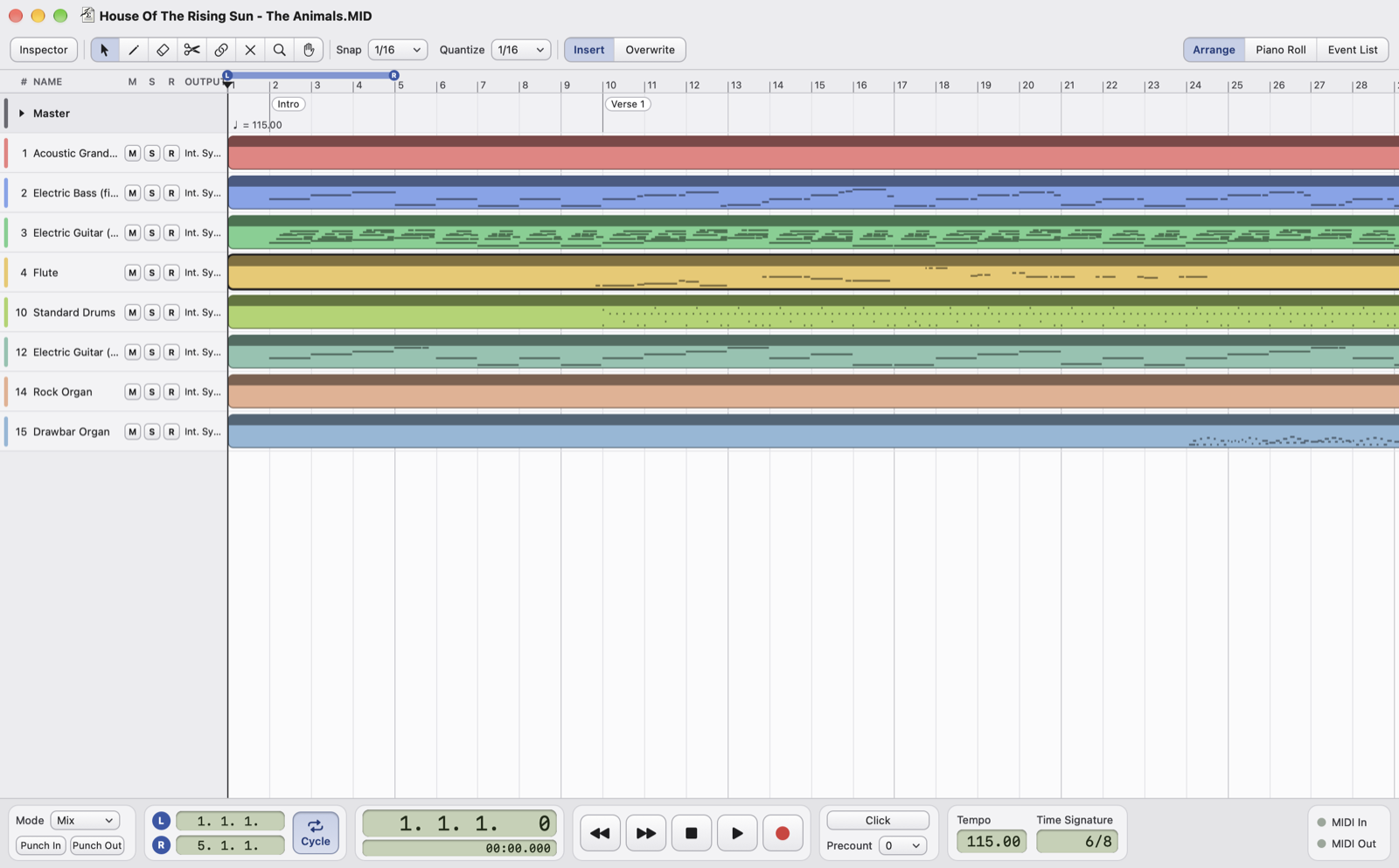
- InspectorShows or hides the channel panel on the left (I key). See Inspector and outputs.
- ToolsArrow, pencil, eraser, scissors, glue, mute, magnifier and hand, also with the keys 1 to 8. They work in the Arrange, the Piano Roll and the Drum Editor.
- Snap and QuantizeSnap is the grid that parts, notes, locators and tempo points stick to. Quantize is the value used by the Quantize and Fixed Length commands, by the pencil and by input quantize. From
1/1to1/64, with triplets and dotted values. - Insert / OverwriteHow Cut, Paste, Delete and Repeat work between the locators: opening and closing space, or overwriting. See Arrange.
- View switchArrange, Piano Roll (or Drum Editor on the drum channel) and Event List. ⌘E goes from the Arrange to the Piano Roll and back, ⌘G opens the Event List.
- Mode and punchHow you record: Mix adds to the existing notes, Replace removes the ones that were there. Punch In and Punch Out record only between the locators. See Recording.
- Locators and cycleThe positions of L and R: type a value to change them. Cycle (O key) starts again from L every time playback reaches R.
- PositionWhere the cursor is, in bars (bar, beat, sixteenth, tick) and in time (minutes, seconds, milliseconds).
- Transport commandsBack and forward one bar (, and .), Stop, Play (space bar) and Record (⌥-Space). A second Stop goes back to the start, or to L if you choose so in Settings.
- Click and precountClick turns the metronome on (C key); Precount plays 1 or 2 bars of click before starting, also when recording.
- Tempo and time signatureTempo and time signature at the cursor. Typing a BPM changes the tempo in effect at that point; with ⌥-Return the whole song changes in proportion. See Tempo and time signature.
- MIDI In and MIDI OutThey light up when a message arrives from an input and when one is sent to the outputs.
Moving around the song
- Space starts and stops; Return plays from L.
- L and R move the cursor to L or R; ⌘L and ⌘R set L or R at the cursor.
- In the ruler, click moves the cursor, ⌘-click sets L, ⌥-click sets R, dragging sets L and R together.
The song plays on the built-in synthesizer or on the MIDI outputs chosen for each channel. Changes made while it plays are heard right away, without stopping; mute and solo take effect from the next event.