Piano Roll
The notes of one channel on a grid, with the keyboard on the left and time flowing to the right. Open it by double-clicking a part, with ⌘E or from the view switch.
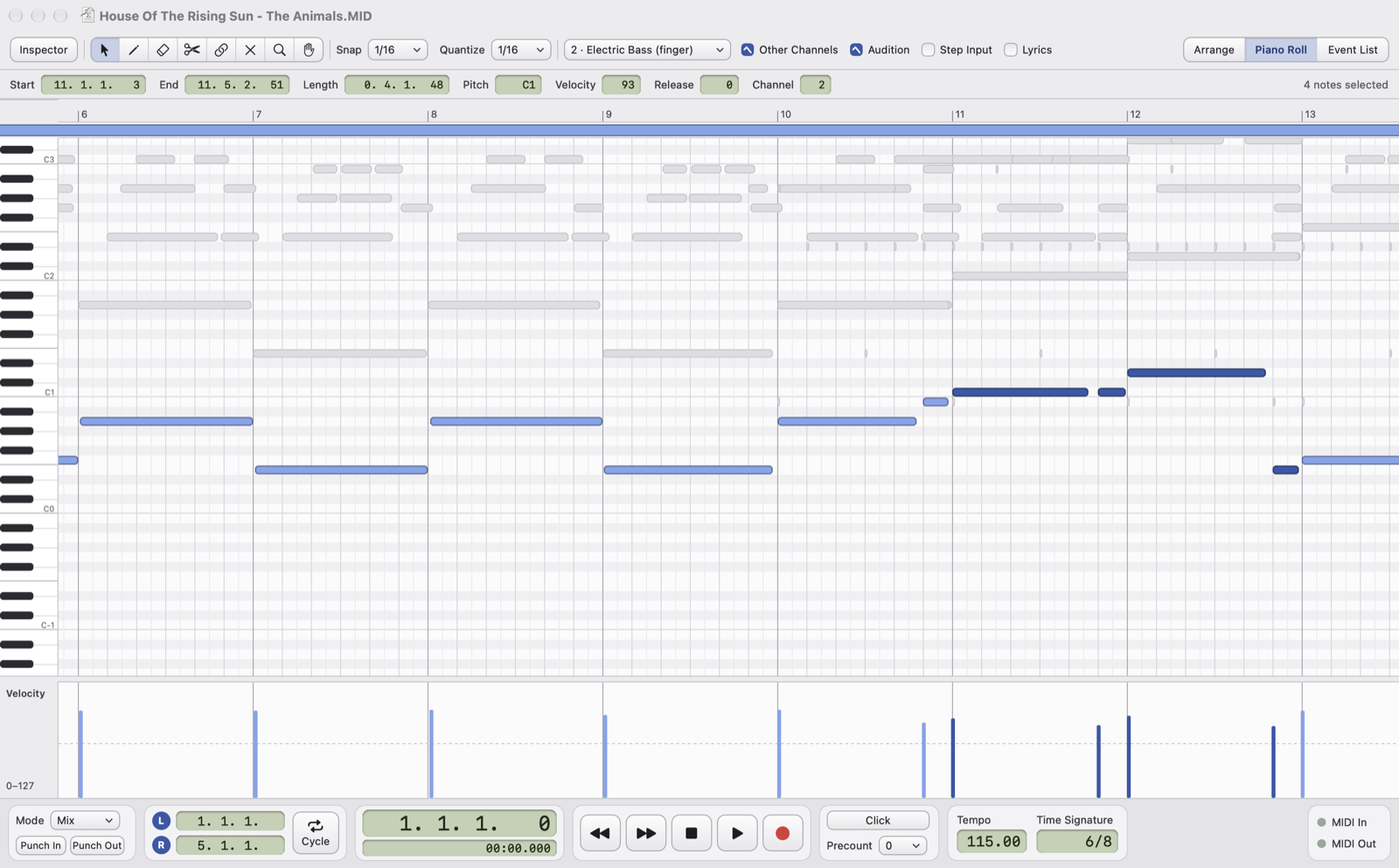
- ChannelThe channel shown: use the menu to switch to another channel without going back to the Arrange.
- Piano Roll checkboxesOther Channels shows in grey the notes of all the other unmuted channels, so you can write while looking at the other parts; Audition plays a note when you click or move it; Step Input enters notes from a MIDI keyboard (see Recording); Lyrics opens the syllable and chord lanes (see Lyrics and chords).
- Info lineStart, end, length, pitch, velocity, release and channel of the selected note: type a value to change it. With several notes you see the first one; start, pitch and velocity change by the same amount for all of them, length and release become the same; a new channel moves the notes to that channel.
- KeyboardThe note names (middle C is C3 or C4, as you choose in Settings); click a key to play it.
- Channel partsBelow the ruler, the strip with the channel's parts; outside the parts the grid is darker.
- Selected notesDarker. The commands in the Notes menu work on these.
- Other channelsThe notes of the other channels, in grey: visible but not editable.
- VelocityOne bar per note: drag to draw them, with ⌥ as a line. If notes are selected only those change.
Editing notes
- Arrow: click selects, ⇧-click or ⌘-click adds and removes, dragging on an empty area selects a rectangle. Drag a note to move it (with Snap), with ⌥ to copy it; drag the right edge to change its length.
- Pencil: a click draws a note as long as the Quantize value; drag to make it longer.
- Eraser deletes, scissors split a note, glue joins equal consecutive notes, mute silences a note without deleting it.
- ⌫ deletes the selected notes, ⌘A selects all the notes of the channel. ⌘X, ⌘C and ⌘V work between the locators, as in the Arrange.
A note belongs to the part where it starts. If you draw or move it outside every part, the nearest part on the left grows to contain it.
The Notes menu
It works on the selected notes; with nothing selected the commands are disabled.
| Quantize (Q) | Moves the start of the notes to the Quantize value in the toolbar; with Quantize Length Too the end as well. |
| Transpose… | By how many semitones, up or down; at the edges (0 and 127) the note stops. |
| Fixed Length | All notes as long as the Quantize value. |
| Legato… | Each note up to the start of the next one; optionally only notes shorter than a value. |
| Velocity… | The same velocity for all, or scaled by a percentage. |
| Delete Duplicates | Removes notes with the same pitch and the same start, keeping the first one. |
| Select from L to R | Selects the notes that start between the locators. |
Zoom
⌘+ and ⌘- horizontally, ⌥⌘+ and ⌥⌘- vertically (taller keys). With the magnifier: click zooms in, ⌥-click zooms out, with ⇧ vertically; the hand drags the view.